

You can set up CRM data cleanup before automation without creating extra busywork. Map your sales flow, decide duplicate and ownership rules, consolidate activity into single records, define real pipeline stages, and test before turning anything on.
If you need a partner later, explore our CRM automation, lead follow-up automation, and this primer on what to automate first.
This plan for CRM data cleanup before automation helps you avoid surprise tasks, messy timelines, and misrouted leads. Your team keeps selling instead of fixing spreadsheets.
Map your sales process before adding CRM fields and automations
If you automate a process you haven’t defined, you accelerate chaos. Map the path a lead follows from first touch to paid customer using your team’s language.
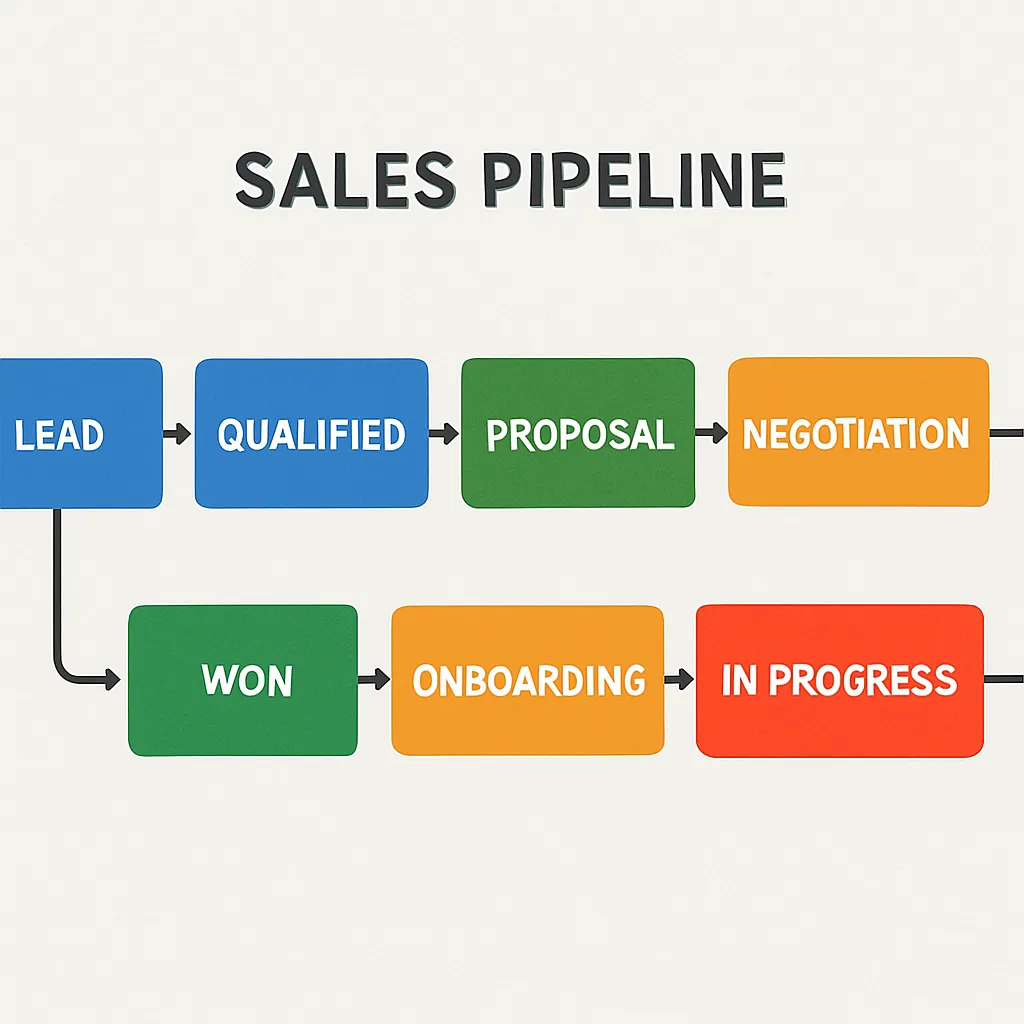
Interview frontline staff on real steps, not ideal ones. Document what moves a deal forward, who does it, and what must be captured once per deal versus once per contact.
Clarify handoffs between marketing, sales, and service, even if one person wears all hats. Note where information is lost, duplicated, or retyped.
Identify the minimum fields that support those handoffs. Add fields only when they drive a decision, ownership, or a next action.
Treat this map as your single source of truth. HubSpot’s lead management overview reinforces defining stages, owners, and handoffs to reduce bottlenecks (HubSpot).
Exceptions to capture in your map
- When one person is both contact and decision-maker, avoid adding a duplicate company if it adds no value.
- If you sell project-based work, decide where details live: the deal record, a custom object, or a linked project tool.
Define duplicate contact rules and ownership clearly
Duplicates create the most busywork once automation starts. Decide what counts as “the same person” or “the same company.”
Pick a primary unique identifier for people, typically email. If customers share inboxes, use phone as the tie-breaker and role or location as secondary clues.
For companies, use website domain as the primary key, with company phone as backup. If you serve local branches around Greater St. Louis, allow multiple locations under one parent with clear naming.
Align ownership rules to your sales map, not inbox timing. Assign by territory, service line, or source, and fall back to round-robin only when no rule matches.
Set merge behaviors now so you don’t guess later. Decide which record wins on fields like source, first touch date, and opt-in status, and which fields should keep all unique values.
Create a review queue for edge cases your rules can’t safely auto-merge. Keep it small and time-boxed.
Starter decisions for deduping and ownership
- Person keys: Email (primary), Mobile or Direct Phone (secondary), plus First + Last Name as a soft match.
- Company keys: Website Domain (primary), Company Phone (secondary), and Legal Name as a soft match.
- Ownership: Territory or service line first; round-robin only if no match.
- Merge precedence: Keep earliest Create Date, most recent Last Activity, and preserve explicit opt-in.
Consolidate activity history into single records
Your team needs one clean timeline per relationship. Link calls, emails, form fills, and meetings to the same contact and company.
Audit capture points such as website forms, call tracking numbers, chat, and calendar links. Confirm each source can identify an existing record via your chosen keys before creating a new one.
Configure integrations to “create or update” based on your unique IDs. Pass external IDs to avoid duplicates when systems sync.
If you rely on tracked phone numbers, ensure the system passes caller ID and, when possible, form data or campaign IDs. That attaches calls and landing-page submissions to the right timeline.
Be strict about what can create a new record. Allow website forms and chat to create contacts, but have inbound emails link to existing records first and prompt review if no match is found.
Edge cases to decide upfront
- Shared inboxes (e.g., info@) should link to the company and active deal owner, not create a new person each time.
- When spouses or partners share a phone, differentiate by first name and preferred contact method to avoid overwrites.
Set pipeline stages that reflect how your team actually sells
Stages are gates with clear criteria, not labels. Automation can trust stage changes only when entry and exit rules are objective.
Start with the steps your team already takes: qualification, discovery, estimate or proposal, decision, and win or loss. Add or rename stages only when they represent a distinct action or outcome.
Define exactly what must be true to enter a stage. For example, “Discovery Complete” could require budget range captured, decision-maker identified, and next meeting scheduled.
Keep the number of stages lean. Extra stages add noise without better forecasts or triggers.
Use stage changes to drive automation later, not yet. For example, entering “Proposal Sent” can queue a 48-hour follow-up reminder and a pricing review when deal size exceeds a threshold.
Attach only the fields you need at each stage to minimize form fatigue. Ask for project timeline at qualification; collect technical details at proposal.
Quick pilot before rollout
Run your proposed pipeline with one salesperson for a week. Capture friction, adjust once, then publish to the team.
CRM data cleanup before automation
With structure in place, run a short, controlled cleanup sprint. Prove your rules before any workflow touches live customers.
Create a sandbox or safe segment of real contacts. Disable automations for that segment while you test deduping, ownership, and activity linking.
Use a standard operating procedure for merges. Log each merge and why it occurred, noting fields that didn’t behave as expected.
Test activity consolidation by submitting a form, placing a tracked call, and booking a calendar meeting using the same identity. Confirm all three attach to one timeline without a second record.
Validate ownership by feeding leads that match different rules. Ensure the right owner gets assigned every time.
When checks pass, enable one narrow automation, such as a single follow-up sequence for one stage. Expand in small steps, verifying each addition with test records first.
Preflight checklist you can run in an hour
- Run a duplicate scan as part of CRM data cleanup before automation and resolve the top 20 collisions using your merge rules.
- Create three test contacts: same email, same phone, and same name/different email. Verify dedupe behavior.
- Attach a call, form fill, and meeting to one test contact. Confirm a unified timeline.
- Move a test deal through each pipeline stage. Ensure required fields and criteria make sense.
- Assign five test leads across your ownership rules. Verify who gets what.
- Turn on one small automation. Confirm expected triggers, tasks, and emails.
Rollout plan that avoids busywork
Start with one team or one product line. Monitor for a week, fix any rules that create friction, and then enable the next layer.
Document what changed, why, and who approved it. This keeps governance tight as you scale CRM data cleanup before automation across the business.
A final note for small-business owners: your team’s time is scarce. With CRM data cleanup before automation, you set rules once and let the system enforce them.
Ready to make this real? Book a quick planning call: Schedule now.