
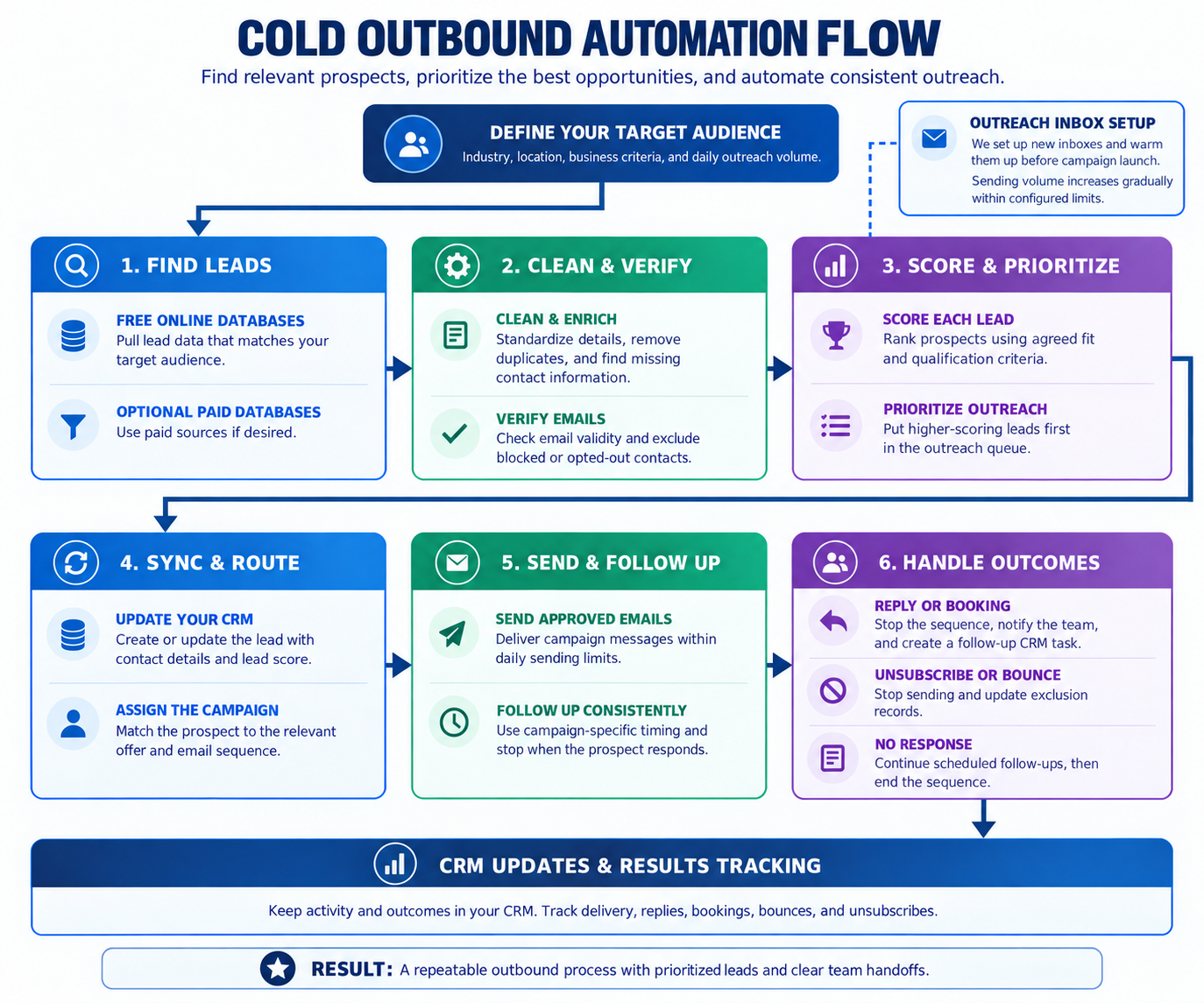
Cold outbound at a glance
Controlled prospecting and outreach, not an unbounded blast
What automated cold outbound can do
Build an outbound pipeline powered by AI
- Collect prospects from approved public, commercial, referral, or client-provided sources
- Preserve the original source and key record details for traceability
- Normalize and deduplicate businesses and contacts before they move forward
- Identify and validate likely official websites and business information
- Fill approved missing fields through permitted enrichment sources
- Qualify prospects using your target-market and campaign rules
- Check prior contact, suppression, opt-outs, and bounce history
- Synchronize eligible prospects and ownership information with your CRM
- Route qualified prospects toward the appropriate campaign while keeping sending limits and stop conditions in place
Start with approved, relevant prospect data
Check contact information before outreach begins
Respect opt-outs, prior contact, and do-not-contact rules
Only move prospects forward when they meet the defined criteria
WHAT GOES INTO AN OUTBOUND BUILD
From raw prospect data to a launch-ready outbound system
Source
Define where prospects come from and what data enters.
- Approved lead sources and collection rules
- Source tracking and original record preservation
- Target-market and prospect criteria
Prepare
Turn raw records into clean, usable prospect data.
- Normalize and deduplicate businesses and contacts
- Discover and validate business and contact information
- Enrich approved fields and verify email addresses
Qualify
Decide who should move forward before they reach outreach.
- Apply fit, campaign, and eligibility rules
- Check suppressions, opt-outs, prior contact, and bounce history
- Sync qualified prospects and ownership data with the CRM
Launch
Test the process and hand over a system ready for outreach.
- End-to-end testing with realistic prospect scenarios
- Documentation of sources, rules, and workflow behavior
- Optional monitoring, maintenance, and ongoing improvements
AN EXAMPLE OUTBOUND ARCHITECTURE
From prospect source to campaign-ready record
A complete build can connect prospect sourcing, data cleanup, qualification, CRM sync, and campaign readiness into one controlled workflow.
Prospect Intake
- Clean prospect records enter the pipeline with their source history intact.
Prospect Qualification
- Better-fit prospects move forward while weak or incomplete records are held back.
Campaign Readiness
- Only eligible prospects are prepared for the appropriate outreach path.
OUTBOUND AUTOMATION FAQ
What to know before automating prospecting
The practical details behind sourcing, qualification, enrichment, campaign readiness, and handoff.
Can we define exactly what makes a good prospect?
Yes. The workflow can use your own targeting rules, such as industry, location, company type, services offered, business characteristics, or other available data. Those rules determine which records continue through the pipeline and which are held back.
What happens when prospect information is incomplete?
The system can identify missing fields and attempt to fill approved gaps using connected data sources or enrichment providers. If the information still cannot be resolved confidently, the record can be held for review instead of automatically moving forward.
Can this work with the CRM we already use?
Usually, yes. The outbound workflow can be built around your existing CRM rather than creating a separate place for your team to manage prospects. Qualified records, ownership, statuses, and relevant activity can be synchronized into the system your team already uses.
Can different prospect types go into different campaigns?
Yes. A single pipeline can support multiple audiences and offers. Qualification rules can determine which campaign, owner, or next step is appropriate for each prospect instead of putting every contact into the same sequence.
How do we keep prospect data from getting stale?
The workflow can track when records were collected, verified, or updated and use those timestamps to decide when information should be refreshed. Older records can be rechecked before they are considered ready for outreach.
Can we review prospects before they move forward?
Yes. Human approval can be added wherever it makes sense. For example, the system can prepare qualified prospects and hold them for review before CRM assignment, campaign entry, or any sending step.
What happens when a prospect replies?
Replies can be used as a stop and handoff condition. The automated path can stop, update the record, and surface the conversation to the appropriate person so your team can take over without the prospect continuing through unnecessary follow-up.
Can we see why a prospect was qualified or rejected?
That can be built into the workflow. The system can preserve source information, relevant qualification results, status changes, and the reason a record advanced or stopped so the pipeline is easier to understand and troubleshoot.