
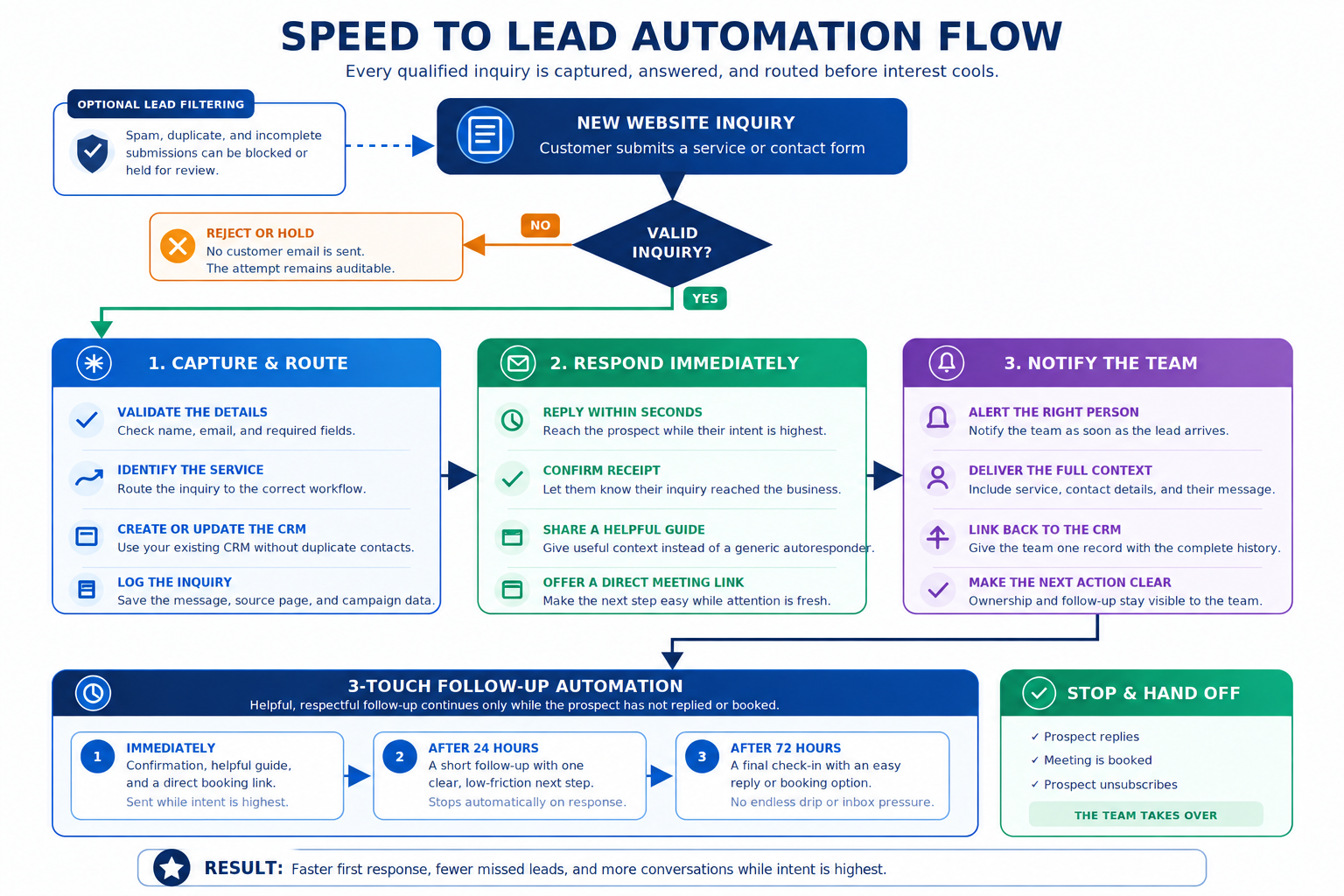
Speed to lead at a glance
From new inquiry to first response
FROM INQUIRY TO FOLLOW-UP
Turn new inquiries into organized follow-up
Respond quickly, organize the record, and hand the right opportunity to the right person.
- Capture new inquiries from forms, calls, email, chat, and other approved sources
- Acknowledge new leads immediately through the right channel
- Create or update the lead and contact in your CRM
- Collect missing details before your team takes over
- Qualify and route leads by service, location, urgency, value, or ownership rules
- Notify the right person when a lead needs human attention
- Offer the appropriate booking or scheduling path
- Create follow-up tasks and reminders when action is still needed
- Stop automated follow-up when someone replies, books, opts out, or is disqualified
- Keep messages, status changes, ownership, and next steps attached to the lead record
New inquiries should not sit untouched
Use business rules to decide what happens next
Replies, bookings, and opt-outs end automated follow-up
Every interaction stays visible in the CRM
WHAT GOES INTO A SPEED-TO-LEAD BUILD
A complete workflow built around how your team sells
Map
Define how leads enter, where they go, and what should happen next.
- Lead-source and trigger mapping
- Qualification and routing rules
- Ownership, handoff, and next-step rules
Build
Connect the systems and automate the repetitive response work.
- Forms, inboxes, CRM, calendar, and other required integrations
- Immediate acknowledgement and follow-up logic
- CRM updates, tasks, reminders, and scheduling actions
Safeguard
Make sure the workflow knows when to stop, and how to recover.
- Duplicate prevention and clean stop conditions
- Logging, error notifications, and workflow visibility
- Recovery paths when an integration or action fails
Launch
Test the full flow and hand over something your team can rely on.
- End-to-end testing with realistic lead scenarios
- Documentation and team handoff
- Optional monitoring, maintenance, and ongoing improvements
EXAMPLE LEAD RESPONSE FLOWS
What your lead flow could look like
Different leads need different paths. These examples show how intake, response, routing, follow-up, and handoff can work together.
Website Inquiry
- Lead is assigned, acknowledged, and moved toward the next step.
Missed Call
- Caller is captured and the right person knows who needs a callback.
Quote Follow-Up
- Open quotes stay visible without endless automated follow-up.
Speed-to-lead FAQ
What to know about speed-to-lead automation
A few practical questions about ownership, CRM data, handoffs, failures, and what happens after launch.
Do we need to replace our CRM or sales process?
No. The goal is usually to work around the systems and process you already use. We map what should happen when a lead arrives, then automate the repetitive steps between your intake sources, CRM, team, and next action.
What happens if the same person submits more than once?
The workflow can check for an existing lead or contact before creating another record. Depending on your rules, it can update the existing record, attach the new inquiry, notify the owner, or treat the new submission as a separate opportunity.
Can different types of leads follow different paths?
Yes. A service request, quote inquiry, missed call, existing customer, or high-value opportunity does not have to follow the same workflow. Routing and next steps can be based on the information available when the lead comes in.
How does the system decide who owns a lead?
Ownership rules are defined during the build. Leads can be assigned by service, location, territory, availability, existing relationship, or other rules that make sense for the business.
What if important information is missing from the inquiry?
The workflow can identify what is missing and attempt to collect it before the lead reaches your team. It can also create the CRM record with the information available and flag what still needs to be collected by a person.
What happens if part of the automation fails?
A production workflow should not silently lose the lead. We build visibility around failures so the issue can be logged, surfaced, and recovered instead of leaving the business assuming everything worked.
Can we see what the automation did with each lead?
Yes. The useful actions should remain visible in the systems your team works from—such as ownership changes, follow-up activity, tasks, messages, bookings, and relevant status updates. The goal is to make the process easier to follow, not hide it behind automation.
Can the workflow change after we launch it?
Yes. Lead processes change as teams, services, territories, and sales rules change. The workflow can be adjusted as you learn which paths, routing rules, handoffs, and follow-up steps fit the business best.